


Lightning Progress Indicator
- Jan 2, 2025
- 6 min read
A lightning-progress-indicator component displays steps horizontally. It indicates the number of steps in each process, the current step, as well as prior steps which is completed.
Steps are created using lightning-progress-step component along with label and value attributes. The current step is specified using the current-step attribute
Type – of progress step can be of two types:
Base type
Path type
If the type is not specified, the default type base is used.
Here let’s see an example of type (path)
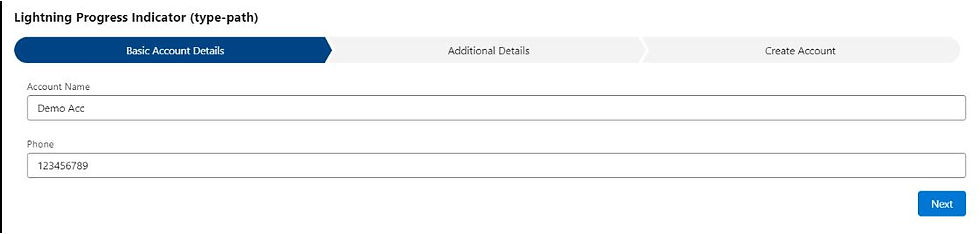
Step 1 : Fill the basic details like Name , Phone & Click on Next button ,
Step 2 :
Choose the rating ,from the drop down and click on Next button ,

Step 3 :
This will be the final steps , where we can see the details we have entered in step 1 & step2

Click on Next button – an Apex class will be called, and Account will be created.
A toast Notification will be shown & you will be navigated to the newly created Account.

Lwc component :
<template>
<lightning-card title="Lightning Progress Indicator (type-path)">
<div class="slds-card slds-var-m-around_medium">
<lightning-progress-indicator current-step={selectedStep} type="path" variant="base">
<lightning-progress-step label="Basic Account Details" value="1"></lightning-progress-step>
<lightning-progress-step label="Additional Details" value="2"></lightning-progress-step>
<lightning-progress-step label="Create Account" value="3"></lightning-progress-step>
</lightning-progress-indicator>
<template if:true={basicdetails}>
<lightning-input type="text" variant="standard" label="Account Name" placeholder="type here..."
class="slds-var-m-around_medium" onchange={handleName} value={name}>
</lightning-input>
<lightning-input type="Phone" variant="standard" label="Phone" placeholder="type here..."
class="slds-var-m-around_medium" onchange={handlePhone} value={phone}>
</lightning-input>
</template>
<template if:true={additionaldetails}>
<lightning-combobox name="progress" label="Status" value={value} placeholder="Select Progress"
options={options} onchange={handleRatingChange} class="slds-var-m-around_medium">
</lightning-combobox>
</template>
<template if:true={createacc}>
<div class="slds-var-m-around_medium">
Account Name : <b> {name} </b> </br>
Phone : <b> {phone} </b> </br>
Rating : <b> {value} </b> </br>
</div>
</template>
<div class="slds-text-align_right slds-var-m-around_medium">
<lightning-button label="Next" onclick={handleNext} variant="brand">
</lightning-button>
</div>
</div>
</lightning-card>
</template>
JS code :
import { LightningElement, track } from 'lwc';
import createAcc from '@salesforce/apex/createAccount.createAcc';
import { ShowToastEvent } from 'lightning/platformShowToastEvent';
import { NavigationMixin } from 'lightning/navigation';
export default class NavigationLWC extends NavigationMixin(LightningElement) {
@track basicdetails = true;
@track additionaldetails = false;
@track createacc = false;
get options() {
return [
{ label: 'Hot', value: 'Hot' },
{ label: 'Warm', value: 'Warm' },
{ label: 'Cold', value: 'Cold' },
];
}
@track name = '';
@track phone = '';
@track value = '';
handleName(event) {
}
handlePhone(event) {
}
handleRatingChange(event) {
this.value = event.detail.value;
}
@track selectedStep = '1';
handleNext() {
var getselectedStep = this.selectedStep;
if (getselectedStep === '1') {
this.basicdetails = false;
this.additionaldetails = true;
this.selectedStep = '2';
}
else if (getselectedStep === '2') {
this.basicdetails = false;
this.additionaldetails = false;
this.createacc = true;
this.selectedStep = '3';
}
else if (getselectedStep === '3') {
this.handleCreateAccount();
}
}
handleCreateAccount() {
.then((result) => {
console.log('result ==' + JSON.stringify(result));
const event = new ShowToastEvent({
title: 'Success',
message: 'Account created successfully',
variant: 'success'
});
this.dispatchEvent(event);
let recordId = result[0].Id;
this[NavigationMixin.Navigate]({
type: 'standard__recordPage',
attributes: {
recordId: recordId,
objectApiName: 'Account',
actionName: 'view'
}
});
}).catch((error) => {
console.log('error ==' + JSON.stringify(error));
})
}
}
Apex Class :
public class createAccount {
@AuraEnabled
public static List<Account> createAcc(String name,String phone,String rating){
List<Account> accList = new List<Account>();
Account acc = new Account();
acc.Name = name;
acc.Phone = phone;
acc.Rating = rating;
accList.add(acc);
insert accList;
return accList;
}
}


Comments